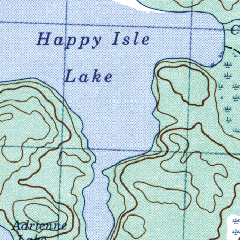
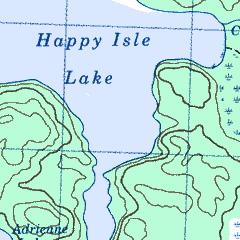
Full Size section of eTopo map Full Size section of QV Map
Review by Lloyd Bowles
This is a new Canadian digital topographic map product from Map Connection of Calgary. It is also available from Map Town . At the time of the review, the Map Town website lists CD's covering all 10 provinces in 1:250,000 scale. They also list CD's covering 18 selected areas such as Algonquin, Quetico and Vancouver Island in 1:50,000 scale. More titles are being added. The maps themselves are scanned from the official Canadian Government topo maps.
Etopo doesn't come with it's own software for viewing, printing & GPS interface. However the maps are pre-calibrated for use in OziExplorer which can be purchased from Map Connection or from OziExplorer . Etopo can also be used with other GPS mapping software, though manual calibration of each map will be necessary. As well, the the maps are compatible with many image viewing & editing software packages.
When Etopo arrived, I was curious to see how it compared to a competitor, Toratech QV. So I loaded an Etopo 1:50,000 scale map into an image editor to view beside the comparable Touratech QV map.
I found that the Etopo map was a bit slow to load from CD, so I checked the file size. Etopo's Opeongo Lake map is 13,148 kb while QV's Opeongo map is 2,823 kb, a full 78% smaller. They are virtually identical in resolution & the actual map area of both, if cropped to remove non-map border, is approximately 4900x3460 pixels. Both are in PNG format, 256 colour format & both are scanned from the same official Canadian government maps. The size difference appears to be due to the number of colours actually used. According to PSP, the Etopo map uses 255 colors while the QV map uses just 9.
The extra colours don't improve Etopo. QV isn't lacking detail, it
has just been smoothed well and has all the colours of the paper topo maps.
Lakes on QV are a single shade of blue & forested areas are a single
shade of green. Etopo lakes & forests appear to have the texture of
the paper they were scanned from. As a result, Etopo maps look a bit muddy
compared to QV when viewed full size, but text & contour lines are
quite readable on both products.
Full Size section of eTopo map
Full Size section of QV Map
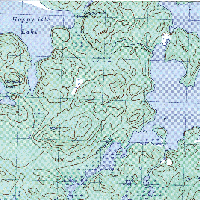
The next images show how Etopo maps look if viewed at 4:1 and at 1:3. The magnified image clearly shows what appears to be paper texture. This texture causes reduced images to appear annoyingly mottled. Touratech QV maps don't show any texture when zoomed.
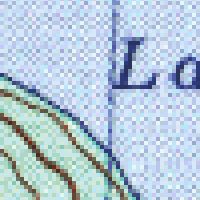
4x Magnified eTopo image
1/3 scale eTopo Image
Next I looked at the Ontario 250,000 scale maps. Etopo's Deep River map file is 6,186 kb & the actual map area (if cropped to remove non map border) is about 3660x2630 pixels. The Deep River map from QV is 2,564 kb & the actual map area is about 4390x3160 pixels. So the QV map image is 20% larger but the file is almost 60% smaller. The QV map uses 15 colours while the Etop map uses 255 colours. The QV map lakes are single colour & smooth while the Etopo map lakes are somewhat mottled but much less noticably than on their 1:50,000 maps. The text in both products is easily readable.
The Touratec QV maps are identical to the paper topos while Etopo maps are cropped and are missing much of the right hand border. This area contains some useful information and only some of it was reprinted elsewhere on the map. The magnetic deviation doesn't appear on the map but is in the Ozi calibration file. The contour interval doesn't appear at all. To me, that's a problem because Canadian topos use several contour intervals depending on the ruggedness of the terrain. These intervals are in feet on maps that haven't been updated in many years & in meters on more recently updated maps. Map Connection was contacted about this and indicated that they will add the contour interval to future map products.
The map legend is printed on the back of paper topo maps but isn't included with the Etopo maps.
I loaded some maps into OziExplorer and checked calibration accuracy at several points, comparing Ozi co-ordinates to the UTM grid printed on the map. Errors were quite small & probably well within the accuracy of the government originals.
Competing Digital Maps
Touratech QV : As discussed above, QV map images are cleaner and load faster than Etopo. They have all of the information that is on the original government maps. Like Etopo, they can be used in other software. Touratech maps come with Touratech's own software for viewing & printing, which includes a very thorough place name database. The software also includes demo GPS interface software that can be activated for a fee. For GPS use though, I prefer OziExplorer. It can load QV maps & accepts QV calibration files. I find it much more intuitive and powerful than Touratech's own GPS interface, and cheaper than the Touratech activation fee.
SoftMap: This package's feature is the viewer, which seamlessly stitches the maps together on screen, so that there are no map boundaries. You can follow a river for hundreds of kilometers from source to mouth without switching maps. Very large areas can be printed out onto multiple sheets of paper. However I found the user interface less intuitive than either Touratech QV or OziExplorer. The maps themselves are lower resolution than the other products and not as readable. They are in a proprietary format that can't be used with other software, except by copying the current window to the clipboard. I didn't test the GPS interface and have been told that it is quite limited.
Conclusion
Etopo map images aren't as clean as Touratech QV & some information
is missing. However, this product is definitely worth consideration,
based on price, available map areas and compatability with OziExplorer.